Skip to content
Services
Hire Developers
Migrations
Industries
Portfolio
Company
Get a quote
itmarkerz

Web, e-commerce, CMS, mobile and custom software, from an engineering team in India with 3–5 hours of overlap with the UK and Europe; US calls by appointment.

Company

  • About us
  • Portfolio
  • Products
  • Technology
  • Pricing
  • Careers
  • Blog
  • Testimonials
  • Help Center
  • Contact us

Contact

4th Floor, Swapna Building, Central Junction, Changanassery, Kerala 686101, India

+91 90747 73494

hello@itmarkerz.co.in

WhatsApp

Mon–Fri 09:00–18:00 IST; meetings outside hours by prior booking

Follow Us

Legal

  • Privacy Policy
  • Terms of Services
  • Legal

Services

Laravel Services

  • Laravel AI Development
  • Laravel Upgrade Service

Integrations

  • Integration Services
  • WooCommerce and Dynamics 365

Mobile

  • iOS App Development
  • Android App Development
  • React Native App Development
  • Flutter App Development

Frontend

  • Angular Development
  • React JS Development
  • Next JS Development
  • Nuxt JS Development
  • VueJS Development
  • HTML5 Development
  • TypeScript Development
  • Tailwind CSS Development
  • Bootstrap Development

Backend

  • Laravel Development
  • NodeJS Development
  • PHP Development
  • Python Development
  • Codeigniter Development
  • Django Development

Database

  • MySQL
  • PostgreSQL
  • Firebase
  • MongoDB

CMS

  • WordPress Development
  • Statamic Development
  • Ghost Development
  • Gatsby Development
  • Strapi Development
  • Django CMS Development

eCommerce

  • Shopify Development
  • WooCommerce Development
  • Adobe Commerce Development
  • BigCommerce Development
  • Opencart Development
  • PrestaShop Development
  • Drupal Commerce Development
  • CubeCart Development
  • Aimeos Development
  • Bagisto Development
  • Laravel Lunar Development
  • Vanilo Development
  • Evershop Development
  • MedusaJS Development
  • SpurtCommerce Development

Maintenance

  • WooCommerce Maintenance
  • WordPress Maintenance
  • Laravel Maintenance

Product

  • Product Strategy Discovery

Software Development

  • Software Product Engineering
  • MVP Development

Hire Developers

Laravel Developers

  • Laravel Developer
  • Laravel AI Developer

Mobile App Developers

  • iOS Developer
  • Android Developer
  • React Native Developer
  • Flutter Developer

Frontend Developers

  • Angular Developer
  • React JS Developer
  • Next JS Developer
  • Nuxt JS Developer
  • VueJS Developer
  • TypeScript Developer

Backend Developers

  • NodeJS Developer
  • PHP Developer
  • Python Developer

eCommerce Developers

  • Shopify Developer
  • WooCommerce Developer
  • Adobe Commerce Developer
  • BigCommerce Developer

CMS Developers

  • WordPress Developer
  • Statamic Developer

Database Developers

  • MySQL Developer
  • PostgreSQL Developer
  • MongoDB Developer

Cloud & DevOps Engineers

  • AWS Developer
  • Azure Developer
  • Docker Engineer

Migrations

eCommerce-to-eCommerce

  • Shopify
  • Adobe Commerce
  • WooCommerce
  • Oracle Commerce
  • BigCommerce
  • Prestashop
  • Drupal Commerce

Migrate to Any Cloud

  • Oracle Cloud
  • Microsoft Azure
  • AWS
  • Google Cloud Platform
  • Salesforce Cloud
  • Onprem to Cloud

Platform Migrations

  • Application Migrations
  • Data Migrations
  • Post Migration Management
  • Migration Expert Augmentation

Enterprise Software Migrations

  • Custom Software Migrations
  • ERP Migrations
  • CRM Migrations
  • KMS Migrations
  • BI & Analytics Migrations

Industries

Sectors we serve

  • Healthcare
  • Finance & Banking
  • E-commerce & Retail
  • Education
  • Real Estate
  • Manufacturing
  • Telecom & IT Services
  • Equipment & Vehicle Rental

Copyright © 2026 itmarkerz Technologies. All rights reserved

All Articles
Content Management Services•
January 12, 2026
•
4 min read
•
Binu Mathew

WordPress to Statamic SEO Migration Checklist (2026): Step-by-Step Guide

A CMS migration can either improve your SEO or destroy years of rankings—there is no middle ground. If you’re planning to migrate from WordPress to Statamic, SEO should be treated as a first-class req...

Feature image for WordPress to Statamic SEO Migration Checklist 2026, showing transition from WordPress to Statamic with an arrow and a checklist, emphasizing step-by-step SEO-safe CMS migration

A CMS migration can either improve your SEO or destroy years of rankings—there is no middle ground.

If you’re planning to migrate from WordPress to Statamic, SEO should be treated as a first-class requirement, not an afterthought. The good news? When done correctly, a Statamic migration can improve performance, Core Web Vitals, and long-term SEO stability.

This step-by-step checklist shows exactly how to migrate from WordPress to Statamic while protecting your rankings, traffic, or authority.
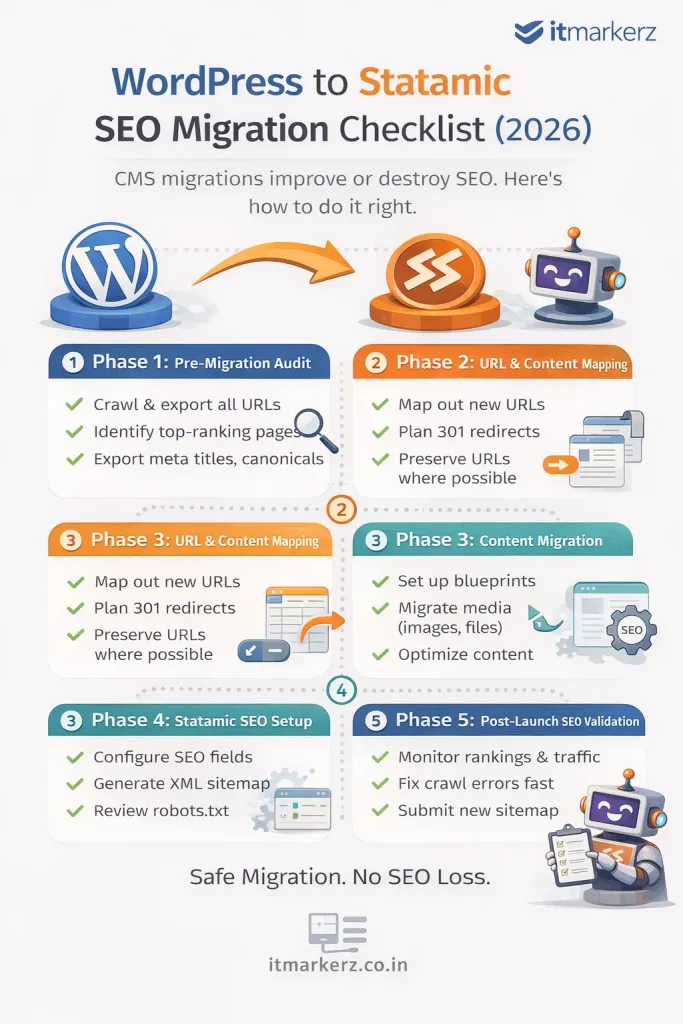
Minimal infographic showing a WordPress to Statamic SEO migration checklist for 2026, outlining pre-migration audit, URL mapping, content migration, Statamic SEO setup, and post-launch validation steps

Why SEO Migrations Fail (And How to Avoid It)

Most SEO losses during CMS migrations happen because of:

  • URL changes without redirects
  • Metadata loss
  • Broken internal links
  • Image path changes
  • Poor post-launch monitoring

Statamic itself is SEO-friendly by design, but migration mistakes—not the CMS—cause ranking drops.


Phase 1: Pre-Migration SEO Audit (DO NOT SKIP)

Before touching Statamic, you must freeze and document your current SEO state.

✅ Crawl the Existing WordPress Site

Use tools like:

  • Screaming Frog
  • Ahrefs / Semrush
  • Google Search Console

Export:

  • All indexable URLs
  • Status codes
  • Canonicals
  • Meta titles & descriptions
  • H1–H6 structure
  • Image URLs
  • Internal links

This becomes your SEO source of truth.


✅ Identify High-Value Pages

Not all pages are equal.

Mark pages with:

  • Highest organic traffic
  • Best keyword rankings
  • Backlinks
  • Conversion value

These pages get extra protection during migration.


✅ Export SEO Metadata

From WordPress SEO plugins (Yoast / RankMath), export:

  • Meta titles
  • Meta descriptions
  • Index / noindex rules
  • Canonicals
  • Open Graph data (optional)

👉 These will map directly into Statamic SEO fields.


Phase 2: URL & Content Mapping (Critical Step)

✅ Preserve URL Structure Wherever Possible

The safest SEO migration is:

Old URL = New URL

Example:

/services/wordpress-development → /services/wordpress-development

Statamic allows full control over routing—use it.


✅ Create a URL Mapping Sheet

For every WordPress URL:

  • Old URL
  • New Statamic URL
  • Redirect required? (Yes/No)

Even one missing redirect can leak SEO authority.


✅ Plan 301 Redirects

If URLs must change:

  • Use 301 redirects only
  • Avoid redirect chains
  • Never rely on 302s

Statamic supports clean redirect rules via:

  • Config files
  • Web server rules (Nginx / Apache)

Phase 3: Content Migration into Statamic

✅ Rebuild Content Using Blueprints

Statamic uses structured content, not page builders.

Best practice:

  • Create collections (Pages, Blog, Resources)
  • Define blueprints with SEO fields
  • Keep content clean and reusable

This improves:

  • SEO consistency
  • Content governance
  • Long-term scalability

✅ Migrate Media Carefully

WordPress media URLs often look like:

/wp-content/uploads/2023/09/image.jpg

During migration:

  • Preserve filenames
  • Avoid changing image URLs if possible
  • Optimize images for size & format (WebP)

Broken images = broken SEO signals.


Phase 4: SEO Setup in Statamic

✅ Configure SEO Fields

Ensure Statamic templates include:

  • Meta title
  • Meta description
  • Canonical URL
  • Open Graph tags
  • Twitter cards (optional)

Statamic’s clean HTML output is a major SEO advantage.


✅ Generate XML Sitemap

  • Include only indexable URLs
  • Exclude test pages
  • Submit new sitemap to Google Search Console immediately after launch

✅ Robots.txt Review

Check:

  • No accidental disallow rules
  • Correct sitemap reference
  • Crawlable assets (CSS, JS)

Phase 5: Pre-Launch SEO Validation

Before going live, test everything.

✅ Crawl the Statamic Staging Site

Confirm:

  • All pages return 200
  • Redirects work correctly
  • Canonicals are correct
  • No orphan pages
  • No duplicate titles

✅ Compare Old vs New SEO Data

Validate:

  • Title parity
  • Description parity
  • Heading structure
  • Internal links

Your Statamic site should be SEO-equivalent or better than WordPress.


Phase 6: Post-Launch SEO Checklist (First 30 Days)

✅ Submit Sitemap in GSC

Immediately submit the new sitemap and request indexing for key pages.


✅ Monitor Rankings & Traffic

For the first 30 days:

  • Watch impressions & clicks
  • Track ranking volatility
  • Fix crawl errors fast

Small drops are normal. Large drops indicate a missed redirect or index issue.


✅ Fix Issues Quickly

Common post-launch fixes:

  • Missing redirects
  • Noindex errors
  • Canonical mismatches
  • Broken internal links

Fast fixes = fast recovery.


SEO Benefits After WordPress → Statamic Migration

When done correctly, teams often see:

  • Faster page load times
  • Better Core Web Vitals
  • Lower bounce rates
  • Improved crawl efficiency
  • More stable rankings

Statamic’s flat-file architecture removes many performance bottlenecks common in WordPress.

Related: what a WordPress to Statamic migration involves and common migration mistakes to avoid.


When You Should NOT DIY This Migration

Do not attempt a DIY SEO migration if:

  • Your site gets significant organic traffic
  • SEO is a primary lead channel
  • You have complex URL structures
  • You rely on organic revenue

In these cases, professional help pays for itself.

👉 Our Statamic Development Services include SEO-safe WordPress migrations, URL mapping, redirect strategy, and post-launch monitoring.


Final SEO Migration Rule

CMS migrations don’t hurt SEO.
Poor planning does.

With the right checklist, WordPress → Statamic migration can be a ranking upgrade, not a risk.

Working on something like this?

Tell us what you need built, fixed or upgraded.

Get a quoteSee Statamic development
More in Content Management Services
Topics covered
#WordPress
Binu Mathew

Binu Mathew

CEO @ itmarkerz technologies

View profile and articles
Binu Mathew

Binu Mathew

CEO @ itmarkerz technologies

Experienced author
28+ published articles
Focus areas:
Content Management Services

In this article

10 sections
Why SEO Migrations Fail (And How to Avoid It)
Phase 1: Pre-Migration SEO Audit (DO NOT SKIP)
Phase 2: URL & Content Mapping (Critical Step)
Phase 3: Content Migration into Statamic
Phase 4: SEO Setup in Statamic
Phase 5: Pre-Launch SEO Validation
Phase 6: Post-Launch SEO Checklist (First 30 Days)
SEO Benefits After WordPress → Statamic Migration
When You Should NOT DIY This Migration
Final SEO Migration Rule

Weekly Digest

Curated tech insights

Get the latest articles and tutorials delivered directly to your inbox.

No spam. Unsubscribe anytime.

Related Articles

You might also like

View all

Migrating from WordPress to Statamic (2026): Cost, Risks & SEO Checklist

Many businesses start with WordPress—and that’s fine.But by 2026, a growing number of marketing teams are asking a serious question: “Is WordPress still the right platform for our marketing site?” If ...

January 12, 2026

Statamic Pricing Guide (2026): Development Cost, License & Maintenance Explained

One of the first questions businesses ask before choosing Statamic is simple: “How much does Statamic really cost?” Unlike WordPress, where costs are spread across plugins, hosting, and ongoing fixes,...

January 10, 2026

Common Mistakes When Migrating from WordPress to Statamic (And How to Avoid Them)

Migrating from WordPress to Statamic can dramatically improve performance, security, and long-term maintenance costs—but only if the migration is done correctly. Unfortunately, many migrations fail no...

January 9, 2026